Free · Printable PDF · Every key and vowel sign
Bamini Keyboard Layout
பாமினி விசைப்பலகை அமைப்பு
Every key of the Bamini Tamil keyboard on one chart, with the Shift layer and all vowel signs. Print it for the typing desk or keep it open while you work. To turn Bamini text into Unicode, use the Bamini to Unicode converter; for the reverse, the Unicode to Bamini converter. Want to practise? Try Bamini typing online.

Scroll sideways to see the whole keyboard, or download the image.
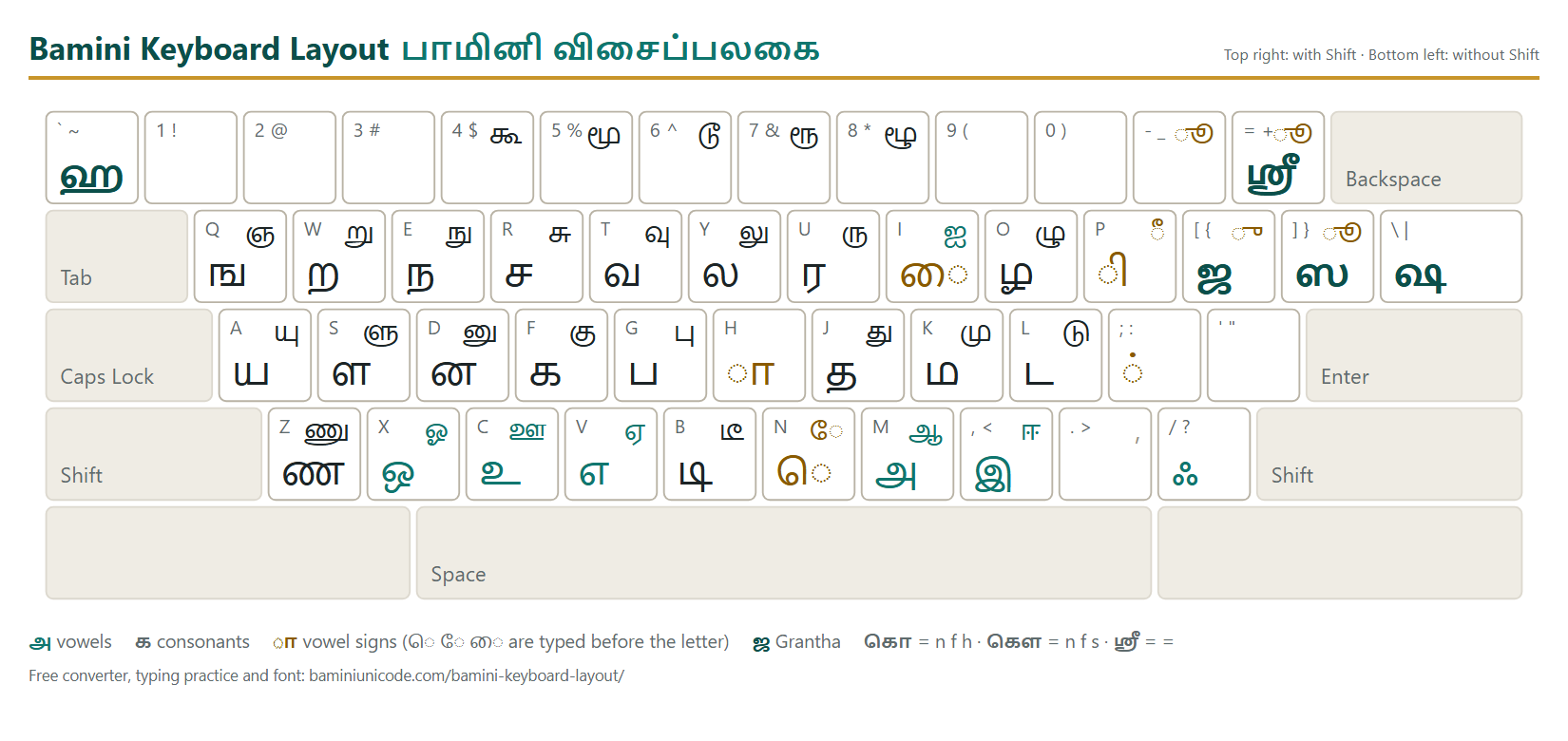
How to read the chart
Each key shows three things. The small English letter at the top left is the key on your keyboard. The large Tamil letter at the bottom left is what you get when you press it. The smaller letter at the top right is what you get with Shift.
So the f key gives க, and Shift + f gives கு. Keys with no Tamil letter, such as the digits, type the same character as on an English keyboard.
ஒவ்வொரு விசையிலும் மேல் இடது மூலையில் ஆங்கில எழுத்து, கீழே பெரிய தமிழ் எழுத்து (Shift இல்லாமல்), மேல் வலது மூலையில் Shift உடன் வரும் எழுத்து. உதாரணமாக f அழுத்தினால் க, Shift + f அழுத்தினால் கு.
Typing vowel signs
Bamini is typed the way Tamil is written on paper, not the way it is spoken. Three rules cover almost every word:
- ெ ே ை come first. Type the sign, then the letter: கெ is n f, கே is N f, கை is i f.
- ொ ோ ௌ are two parts. Type the front part, the letter, then the back part: கொ is n f h, கோ is N f h, கௌ is n f s.
- ு and ூ have their own keys. Most consonants have a Shift key for the ு form (கு is F). For ூ, add + or } after it (சூ is R +, தூ is J }), or use a single key for the common ones (கூ is $, மூ is %).
- காfh
- கிfp
- கீfP
- குF
- கூ$
- க்f;
- கெnf
- கேNf
- கைif
- கொnfh
- கோNfh
- கௌnfs
ெ, ே, ை குறிகளை எழுத்துக்கு முன் தட்டச்சு செய்யுங்கள். ொ, ோ, ௌ இரண்டு பகுதிகளாக, எழுத்தின் இரு பக்கமும் வரும். ு, ூ வடிவங்களுக்குத் தனி விசைகள் உண்டு.
Type வணக்கம் with the Bamini keyboard
- Press t for வ. · t அழுத்தினால் வ.
- Press z for ண. · z அழுத்தினால் ண.
- Press f, then ; for க். The semicolon adds the pulli. · f, பிறகு ; அழுத்தினால் க். அரைப்புள்ளி புள்ளியைச் சேர்க்கும்.
- Press f for க. · f அழுத்தினால் க.
- Press k, then ; for ம். · k, பிறகு ; அழுத்தினால் ம்.
You have typed tzf;fk;. In the Bamini font it reads வணக்கம். Lowercase key names mean no Shift.
All letters and their keys
Vowels · உயிர் எழுத்துகள்
- அm
- ஆM
- இ,
- ஈ<
- உc
- ஊC
- எv
- ஏV
- ஐI
- ஒx
- ஓX
- ஔxs
- ஃ/
Consonants · மெய் எழுத்துகள்
- கf
- ஙq
- சr
- ஞQ
- டl
- ணz
- தj
- நe
- பg
- மk
- யa
- ரu
- லy
- வt
- ழo
- ளs
- றw
- னd
Grantha letters · கிரந்த எழுத்துகள்
- ஜ[
- ஷ\
- ஸ]
- ஹ`
- ஸ்ரீ=
- க்ஷf;\
ு and ூ forms, டி and டீ
- குF
- சுR
- டுL
- ணுZ
- துJ
- நுE
- புG
- முK
- யுA
- ருU
- லுY
- வுT
- ழுO
- ளுS
- றுW
- னுD
- கூ$
- சூR+
- டூ^
- ணூZ}
- தூJ}
- நூE}
- பூG+
- மூ%
- யூA+
- ரூ&
- லூY}
- வூT+
- ழூ*
- ளூSh
- றூW}
- னூD}
- டிb
- டீB
Questions · கேள்விகள்
Is Bamini the same as the Tamil typewriter layout?பாமினியும் தமிழ் தட்டச்சுப் பொறி அமைப்பும் ஒன்றா?
Bamini follows the old Tamil typewriter keyboard, so typists who learned on a typewriter find the letters where they expect them. Vowel signs such as ெ are typed before the consonant, in the order they are written on paper. Tamil99 and phonetic layouts work differently: there you type in the order the word is spoken.
பாமினி பழைய தமிழ் தட்டச்சுப் பொறியின் விசை அமைப்பைப் பின்பற்றுகிறது. அதனால் தட்டச்சுப் பொறியில் பழகியவர்களுக்கு எழுத்துகள் அதே இடத்தில் இருக்கும். ெ போன்ற குறிகள் எழுத்துக்கு முன்பே தட்டச்சு செய்யப்படுகின்றன. Tamil99, ஒலிப்பு அமைப்புகளில் பேசும் வரிசையில் தட்டச்சு செய்கிறோம்.
How do I type ஸ்ரீ and க்ஷ?ஸ்ரீ, க்ஷ எப்படித் தட்டச்சு செய்வது?
ஸ்ரீ has its own key: press = (the equals key next to Backspace). க்ஷ is typed as three keys without Shift, f ; \ , which is க் followed by ஷ. A vowel sign on க்ஷ goes before the ஷ, so க்ஷே is f ; N \.
ஸ்ரீ-க்குத் தனி விசை உண்டு: = (Backspace அருகில் உள்ளது). க்ஷ மூன்று விசைகள்: f ; \ (க் பிறகு ஷ). க்ஷே என்றால் ே குறி ஷ-க்கு முன் வரும்: f ; N \.
I pressed the keys but I see English letters. Why?விசைகளை அழுத்தினாலும் ஆங்கில எழுத்துகள் தெரிகின்றன. ஏன்?
Bamini text only looks Tamil when it is set in the Bamini font. Select the text and choose Bamini in the font box. If you want Unicode Tamil for WhatsApp, Gmail or e-Office instead, type as usual and paste the result into the Bamini to Unicode converter.
பாமினி எழுத்துருவைத் தேர்ந்தெடுத்தால் மட்டுமே உரை தமிழாகத் தெரியும். உரையைத் தேர்ந்தெடுத்து எழுத்துருப் பெட்டியில் Bamini தேர்வு செய்யுங்கள். WhatsApp, Gmail-க்கு யூனிகோட் வேண்டுமானால், தட்டச்சு செய்த உரையை பாமினி டு யூனிகோட் மாற்றியில் ஒட்டுங்கள்.
Can I print this chart or share it?இந்த அட்டவணையை அச்சிடலாமா, பகிரலாமா?
Yes. The PDF is one A4 landscape page with the full keyboard, every vowel sign and all the ு and ூ keys, ready to pin next to a typing desk. The PNG image suits WhatsApp groups and training handouts. If you put it on a website, please link back to this page.
ஆம். PDF ஒரே A4 பக்கத்தில் முழு விசைப்பலகையையும் எல்லா உயிர்க் குறிகளையும் காட்டும்; தட்டச்சு மேசை அருகில் ஒட்டி வைக்கலாம். PNG படத்தை WhatsApp குழுக்களில் பகிரலாம். இணையதளத்தில் வெளியிட்டால் இந்தப் பக்கத்திற்கு இணைப்புக் கொடுங்கள்.