Tamil99 Keyboard – Type Tamil Online
தமிழ்99 விசைப்பலகை – ஆன்லைன்
Type Tamil with the Tamil99 keyboard, the layout standardised by the Tamil Nadu government in 1999. Copy the result as Unicode, or switch to Practice for timed typing.
What you type stays in this browser. Nothing is sent to our server.
Use a different layout? Try the Bamini keyboard, the Tamil typewriter keyboard or English to Tamil typing. For text in an old Tamil font, use the Bamini to Unicode converter or the Tamil font converter.
Tamil99 keyboard layout chart

Scroll sideways to see the whole keyboard, or download the PDF.
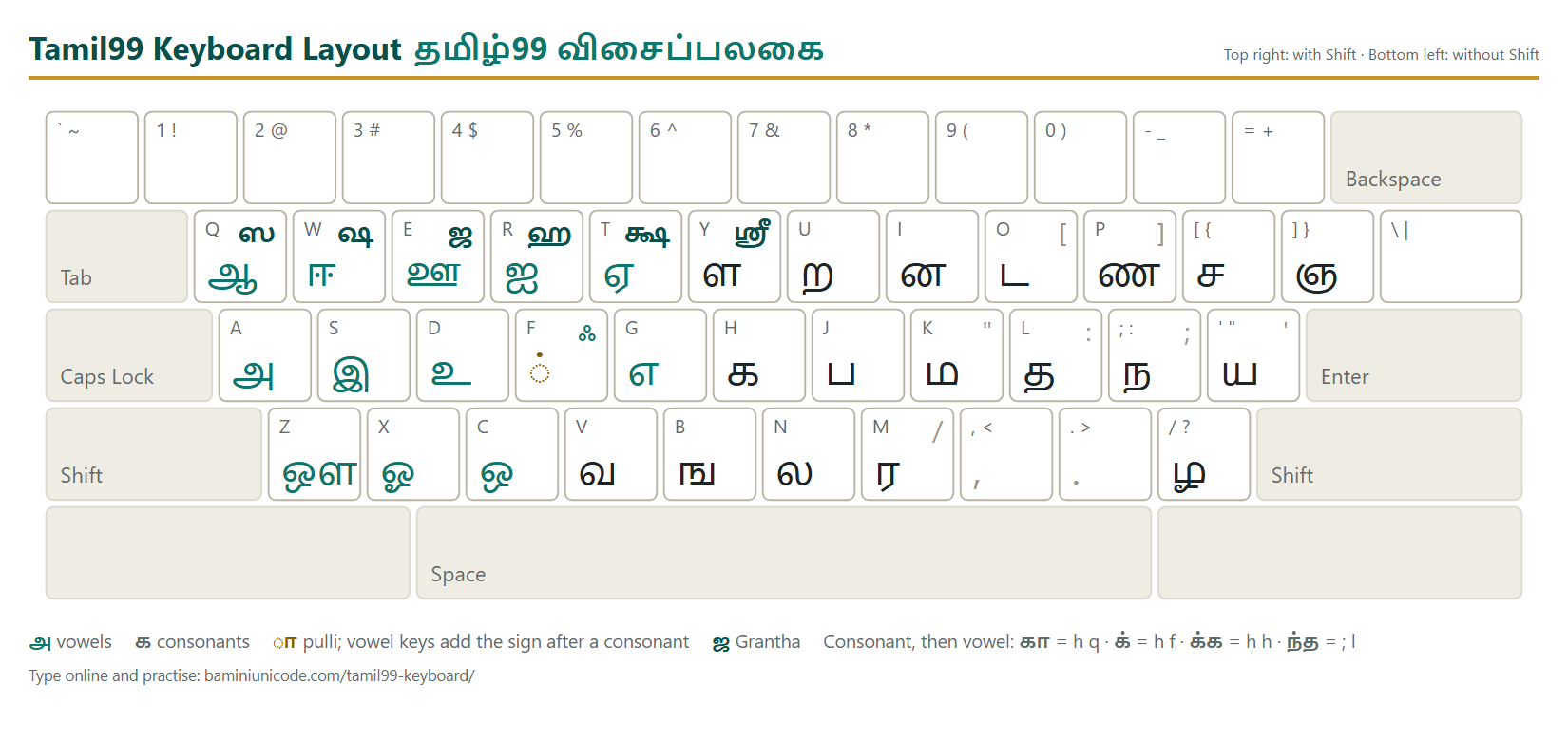
| Key | Tamil | With Shift | Tamil |
|---|---|---|---|
| q | ஆ | Q | ஸ |
| w | ஈ | W | ஷ |
| e | ஊ | E | ஜ |
| r | ஐ | R | ஹ |
| t | ஏ | T | க்ஷ |
| y | ள | Y | ஸ்ரீ |
| u | ற | U | |
| i | ன | I | |
| o | ட | O | [ |
| p | ண | P | ] |
| [ | ச | { | |
| ] | ஞ | } | |
| a | அ | A | |
| s | இ | S | |
| d | உ | D | |
| f | ◌் | F | ஃ |
| g | எ | G | |
| h | க | H | |
| j | ப | J | |
| k | ம | K | " |
| l | த | L | : |
| ; | ந | : | ; |
| ' | ய | " | ' |
| z | ஔ | Z | |
| x | ஓ | X | |
| c | ஒ | C | |
| v | வ | V | |
| b | ங | B | |
| n | ல | N | |
| m | ர | M | / |
| / | ழ | ? |
The layout follows the official TamilNet99 keyboard chart and matches Microsoft's Tamil 99 layout. The eight Shift keys for Tamil symbols such as ௹ are not included here. If a key differs from your keyboard, tell us which key.
How Tamil99 works
Tamil99 is typed in the order Tamil is spoken: the consonant first, then the vowel. The vowel keys on the left hand give a full vowel on their own, and a vowel sign after a consonant.
- Consonant + vowel: h gives க, then q makes it கா, s கி, g கெ, x கோ.
- Pulli: f adds ் to the consonant before it: h f gives க்.
- Automatic pulli on doubled letters: press a consonant twice and the first gets a pulli: h h gives க்க. A third press gives க்கக.
- Automatic pulli on common pairs: ங்க, ஞ்ச, ண்ட, ந்த, ம்ப and ன்ற need no f: ; l gives ந்த.
- Keeping the அ sound: after a consonant, a keeps it as it is, so the next vowel key starts a new letter: h a s gives கஇ.
- Grantha: Shift+Q ஸ, W ஷ, E ஜ, R ஹ, T க்ஷ, Y ஸ்ரீ, and F gives ஃ.
| Word | Tamil99 keys |
|---|---|
| தமிழ் | l k s / f |
| அம்மா | a k k q |
| வணக்கம் | v p h h k f |
| தோட்டம் | l x o o k f |
| பந்து | j ; l d |
| நன்றி | ; i u s |
தமிழ்99-இல் பேசும் வரிசையில் அடிக்கிறோம்: முதலில் மெய், பிறகு உயிர். f புள்ளி சேர்க்கும். ஒரே மெய்யை இருமுறை அடித்தாலும், ங்க ஞ்ச ண்ட ந்த ம்ப ன்ற போன்ற இணைகளிலும் புள்ளி தானாக வரும்.
Tamil99 vs Bamini, typewriter and phonetic
| Layout | Typing order | கொ is typed |
|---|---|---|
| Tamil99 (this page) | As spoken: consonant, then vowel | h c |
| Bamini | As written: ெ first | n f h |
| Tamil typewriter | As written: ெ first | b f h |
| Phonetic | English spelling | ko |
Tamil99 puts the vowels under the left hand and the consonants under the right, and the automatic pulli saves key presses on common clusters. If you already type Bamini or a typewriter layout fluently, there is no need to switch.
Install the Tamil99 keyboard on Windows
Windows includes Tamil 99. In Settings › Time & language, add Tamil as a language, then choose Add a keyboard and pick Tamil 99. Switch between keyboards with Windows + Space. Microsoft's Tamil input guide describes the same steps.
For other systems, the free Keyman Thamizha Tamil99 keyboard uses the same base layout; its Shift+T and Shift+Y are swapped (ஸ்ரீ and க்ஷ) compared with the official chart.
Questions · கேள்விகள்
What is the Tamil99 keyboard?தமிழ்99 விசைப்பலகை என்றால் என்ன?
Tamil99 is the Tamil keyboard layout standardised by the Tamil Nadu government through TamilNet99 in 1999. Vowels sit under the left hand and consonants under the right, and you type in spoken order: consonant first, then vowel.
தமிழ்99 என்பது 1999-இல் தமிழ்நெட்99 மூலம் தமிழ்நாடு அரசு தரப்படுத்திய விசைப்பலகை அமைப்பு. உயிர்கள் இடது கையிலும் மெய்கள் வலது கையிலும் உள்ளன; பேசும் வரிசையில் அடிக்கிறோம்.
How do I type the pulli in Tamil99?தமிழ்99-இல் புள்ளி எப்படி?
Press f after the consonant: h f gives க். You often do not need it: a doubled consonant such as h h gives க்க, and the pairs ங்க, ஞ்ச, ண்ட, ந்த, ம்ப and ன்ற get their pulli automatically.
மெய்யின் பின் f அழுத்துங்கள்: h f = க். இரட்டை மெய் (h h = க்க) மற்றும் ங்க, ஞ்ச, ண்ட, ந்த, ம்ப, ன்ற இணைகளில் புள்ளி தானாக வரும்.
Why did my vowel become a separate letter?உயிர் ஏன் தனி எழுத்தாக வந்தது?
After a consonant, the a key keeps the consonant as it is and stops the next vowel joining it. So h a s gives கஇ, while h s gives கி. Delete the extra letter and type the vowel key straight after the consonant.
மெய்யின் பின் a அழுத்தினால், அடுத்த உயிர் அதனுடன் சேராது: h a s = கஇ, h s = கி. கூடுதல் எழுத்தை நீக்கி, மெய்யின் பின் நேரடியாக உயிர் விசையை அடியுங்கள்.
How do I install Tamil99 on Windows?Windows-இல் தமிழ்99 எப்படி நிறுவுவது?
Windows includes it. In Settings, open Time & language, add Tamil as a language, choose Add a keyboard and pick Tamil 99. Switch keyboards with Windows + Space.
Windows-இலேயே உள்ளது. Settings › Time & language-இல் தமிழைச் சேர்த்து, Add a keyboard-இல் Tamil 99 தேர்வு செய்யுங்கள். Windows + Space மூலம் மாறலாம்.
Does the output work in Word and WhatsApp?வெளியீடு Word, WhatsApp-இல் வேலை செய்யுமா?
Yes. The text is Unicode Tamil, so it pastes correctly into Word, WhatsApp, Gmail and web forms on any device. For PageMaker or CorelDRAW, press Convert to Bamini.
ஆம். உரை யூனிகோட் தமிழ்; Word, WhatsApp, Gmail என எங்கும் சரியாக ஒட்டலாம். PageMaker-க்கு Convert to Bamini அழுத்துங்கள்.